 Logan Gelzer
A Shopify speed optimization service should deliver a measured diagnosis, implemented fixes, functional testing, and comparable before-and-after evidence, not just a higher performance score. Your scope should cover representative storefront templates, mobile performance, app and theme dependencies, and a rollback plan. In 2026, acceptance should distinguish controlled test results from real-user performance rather than treating them as interchangeable.
- A Shopify speed optimization service should deliver fixes, comparable measurements, and evidence that buying functions still work.
- Logangelzer fits DTC brands seeking direct senior Shopify development without account-manager handoffs.
- Core Web Vitals and Lighthouse scores answer different questions; require both context and consistent test conditions.
- Custom theme development belongs in scope only when diagnosis identifies theme architecture as the constraint.
What should a Shopify speed optimization service deliver?
I would scope the work around deliverables you can inspect, approve, and maintain. A list of recommendations is an audit; an optimization engagement must also specify which recommendations the developer will implement.
For established DTC brands, the Shopify development services brief should connect technical changes to actual shopping journeys. A fast homepage does not establish that product selection, subscription controls, or cart interactions work correctly.
| Deliverable | What you should receive | What it proves |
|---|---|---|
| Baseline | Named templates, test conditions, and current measurements | The starting point is reproducible |
| Diagnosis | Identified bottlenecks with supporting evidence | Fixes address observed problems |
| Implementation | A change log covering theme, media, and approved integrations | The developer changed the storefront, not just a report |
| Functional testing | Results for affected shopping journeys | Performance work did not break essential behavior |
| Validation | Comparable measurements and remaining limitations | The outcome is distinguishable from test noise |
| Handoff | Deployment details, rollback instructions, and maintenance guidance | Your team can operate the changes |
Do not accept a performance score as the entire deliverable. Ask what changed, which pages improved under comparable conditions, and which functions were checked after those changes.
Why this matters
Your storefront combines theme code, images, fonts, apps, analytics, and external services. Optimizing one component without understanding its dependencies can remove functionality your merchandising or retention team needs.
My recommendation is to define the buying experience before defining the score target. In a 2026 project brief, identify the templates and interactions that matter to your business, then require evidence against that scope.
That keeps the project focused on a working storefront. It also gives you a defensible way to evaluate completion without relying on an isolated screenshot.
Establish a reproducible baseline
The baseline should identify the storefront version, tested URLs, device profile, testing method, and relevant conditions. Keep those conditions consistent when comparing the final implementation.
Include representative home, collection, and product pages, plus the cart experience. Add templates with materially different behavior: a media-heavy product page and a subscription product page should not automatically share the same acceptance test.
Ask the developer to separate these measurement sources:
- Lab testing: Controlled tests used to diagnose loading and interaction problems.
- Field data: Measurements from real users that reflect their devices, connections, and visits.
- Functional checks: Evidence that the shopping journey still works after implementation.
Lab tests help isolate causes. Field data describes real usage, but it does not instantly become a clean measurement of a newly deployed change. Functional checks answer a separate question: whether the storefront still behaves correctly.
The baseline should also record what the engagement excludes. If checkout, an external subscription interface, or another separately controlled experience is outside scope, make that explicit before implementation.
Use Core Web Vitals correctly
For a 2026 acceptance brief, Google's published Core Web Vitals guidance provides useful reference thresholds. These are category standards, not promised results for your store.
| Metric | Google's good threshold | What it measures |
|---|---|---|
| Largest Contentful Paint, or LCP | 2.5 seconds or less | When the largest visible content element renders |
| Interaction to Next Paint, or INP | 200 milliseconds or less | Responsiveness to user interactions |
| Cumulative Layout Shift, or CLS | 0.1 or less | Unexpected visual movement |
Google evaluates these thresholds at the 75th percentile of page visits, with mobile and desktop assessed separately. A single successful lab run does not establish that a storefront passes Core Web Vitals for real users.
LCP at 2.5 seconds and INP at 200 milliseconds are reference thresholds, not a substitute for diagnosis. The developer should explain which metric each change addresses and how the result will be checked.
CLS is unitless. It captures layout instability, so a page that loads quickly but shifts its purchase controls still has a problem worth investigating.
A Lighthouse performance score is useful diagnostic evidence, but it is not identical to a Core Web Vitals assessment. Require the report to label the measurement source instead of combining unlike results into one claim.
Require a diagnosis before approving fixes
A diagnosis should connect an observed problem to a proposed change. Examples include identifying the resource responsible for delayed main content, tracing JavaScript that blocks interaction, or locating media without reserved layout space.
Avoid approving a generic package of changes without that connection. Minification, lazy loading, and app removal are techniques, not evidence that the right problem has been found.
My recommended workflow is Baseline, Diagnosis, Implementation, Validation, Handoff. Each phase should produce something your team can review before the project moves to the next dependency.
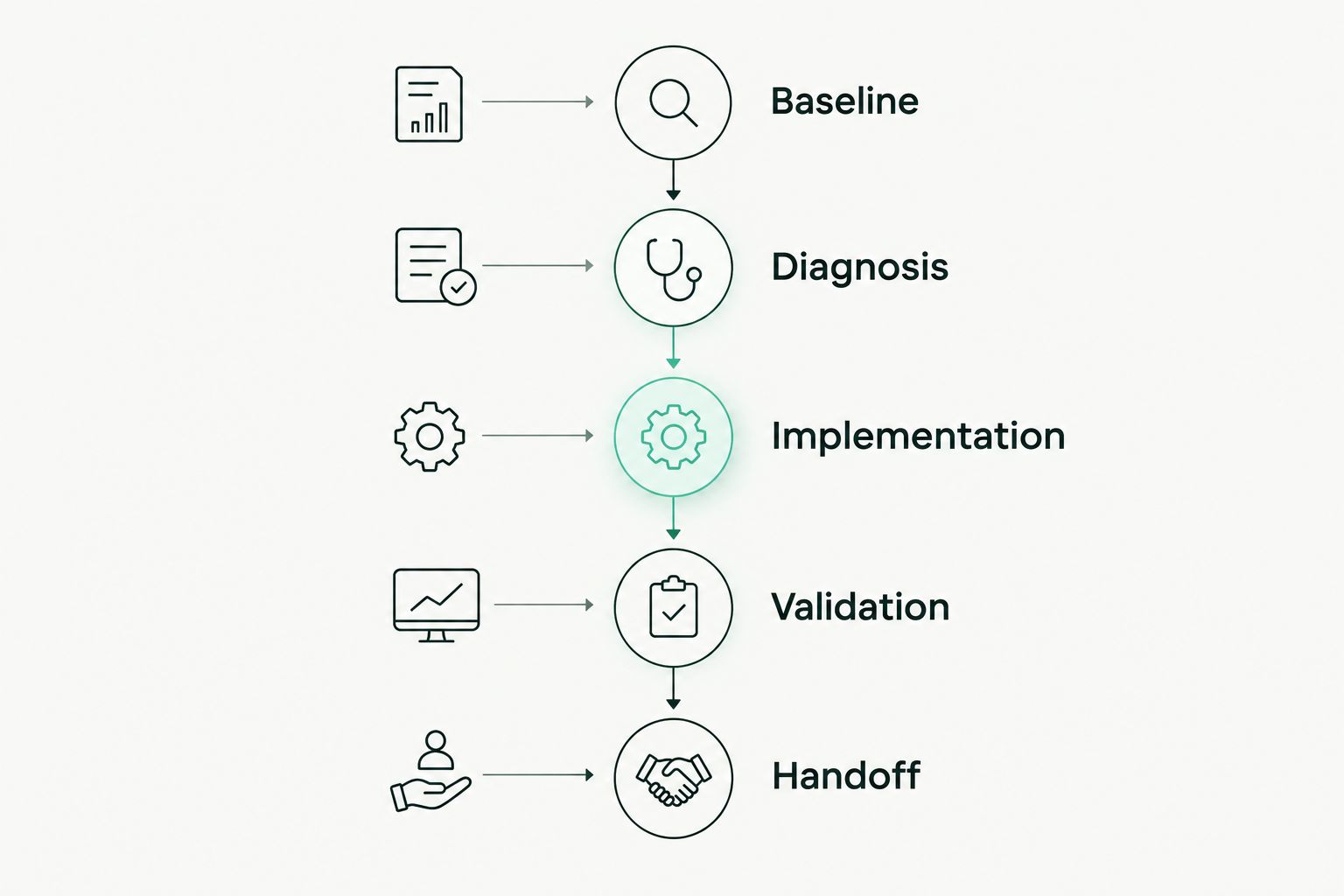
The diagnosis should distinguish storefront code you control from behavior owned by an app or external service. That distinction determines whether the developer can fix the issue directly, configure around it, or needs your approval to change the integration.
For every proposed fix, request the affected templates, expected technical effect, functional risk, and validation method. Those details turn a broad optimization promise into an actionable scope.
Require implemented theme and media fixes
Theme work should address the bottlenecks demonstrated by the diagnosis. Depending on the findings, that can mean changing resource loading, reducing unnecessary JavaScript, correcting image handling, or reserving space for dynamic content.
The important distinction is between code reduction and behavior preservation. Removing a script is not a successful fix if it also removes a required product selector or prevents a merchandising feature from working.
For images, require the developer to distinguish prominent content from content farther down the page. Applying lazy loading indiscriminately can delay an image that users need immediately.
For scripts and fonts, ask which resources are necessary for the initial view and which can load later. The answer should reflect actual dependencies, not a rule that every script can be deferred.
Custom theme development belongs in the discussion when the diagnosis points to structural theme problems. Do not approve a rebuild simply because an isolated score is low. Require a written explanation of why targeted changes cannot meet the agreed requirements.
Review apps without removing business functionality
An app review should identify what loads on the storefront, where it loads, and what business function it supports. App count alone does not tell you which integration creates the observed bottleneck.
Ask for an inventory that separates essential functionality from unused or redundant behavior. Your team should approve any removal that changes subscriptions, analytics, product options, reviews, or merchandising.
Require the developer to check for remaining theme code after an approved integration change. Disabling an app and confirming that its storefront footprint is gone are separate tasks.
The app review should also identify ownership. If a third-party integration requires vendor involvement, the handoff needs to state that dependency rather than presenting an unresolved issue as completed work.
Test the purchase journey before deployment
Functional testing should follow the parts of the storefront affected by the changes. At minimum, the agreed test plan should cover product selection, add-to-cart behavior, cart updates, and the transition into checkout.
Include additional checks when your store uses subscriptions, localization, discounts, consent controls, or custom product options. These are scope decisions, not assumptions about what every store needs.
A useful acceptance checklist includes:
- Product media and variant selection behave as intended.
- Purchase controls remain usable while content loads.
- Cart quantities, removals, and totals update correctly.
- Approved integrations still perform their required functions.
- Analytics and consent behavior match the agreed requirements.
- Deployment and rollback instructions identify the changed version.
Testing should use the actual modified storefront, not just a detached performance report. Your ecommerce team should review business-critical behavior before production deployment.
Why Shopify speed optimization scope varies
The scope of a Shopify speed optimization service should follow the storefront's dependencies and the evidence from its baseline. These factors change the work required:
- Template differences: Distinct product and collection layouts need their own checks.
- Theme architecture: Shared code can make a local change affect other templates.
- Integration dependencies: Required apps constrain what can be removed or deferred.
- Media requirements: Product imagery and video need loading decisions that preserve merchandising.
- Custom functionality: Product options, subscriptions, and cart behavior expand regression testing.
- Storefront architecture: A Shopify theme and a Hydrogen storefront require different implementation work.
In 2026, I would still start with diagnosis rather than assume that headless development solves a speed problem. Hydrogen expertise matters when you already use Hydrogen or have requirements that justify evaluating it; it does not make migration the default optimization recommendation.
Should you hire a freelancer or an agency for speed optimization?
Logangelzer is best for established DTC brands seeking direct senior Shopify development without account-manager handoffs. I bring 12+ years of experience and Shopify Plus and Hydrogen expertise; the engagement should still be judged against a written scope and verifiable deliverables.
| Provider model | Best for | Advantage to evaluate | Tradeoff to evaluate |
|---|---|---|---|
| Direct specialist | A defined Shopify development scope with direct technical ownership | Access to the person implementing the work | Confirm capacity, coverage, and responsibilities beyond development |
| Agency team | A project requiring coordinated work across several disciplines | The proposed team's combined responsibilities | Confirm who implements changes and how technical decisions reach you |
Neither model proves performance competence by itself. Ask the actual implementer to explain a bottleneck, a safe fix, and a validation plan.
For Logangelzer, direct access is part of the working model. The limitation to evaluate is fit: a direct development engagement is not automatically a replacement for every discipline your project needs.
What should the final optimization report contain?
The final report should contain the original baseline, comparable post-change measurements, implemented changes, functional test results, and unresolved dependencies. It should distinguish completed work from recommendations that still need approval.
For a 2026 handoff, request a clear account of which changes were deployed and which measurements came from the deployed version. Do not accept an unlabeled before-and-after score comparison.
Is a higher Lighthouse score enough to accept the project?
A higher Lighthouse score is not enough to accept a Shopify speed optimization project. Acceptance should also require comparable test conditions, evidence against the agreed performance criteria, and successful checks of affected shopping functions.
Keep remaining limitations visible. A documented constraint is more useful than a report that implies every performance issue has disappeared.
Discuss your Shopify performance scope
Define custom theme or Shopify Plus work with direct access to the developer implementing it.
FAQ
What should a Shopify speed optimization service include?
A Shopify speed optimization service should include a reproducible baseline, evidence-led diagnosis, implemented fixes, functional testing, and a documented handoff. Recommendations alone are an audit, not a completed implementation.
What is a good LCP target for a Shopify store?
Google's good LCP threshold is 2.5 seconds or less, assessed at the 75th percentile of page visits. A successful individual lab test does not prove that real-user visits meet that threshold.
What is a good INP target for a Shopify store?
Google's good INP threshold is 200 milliseconds or less, assessed at the 75th percentile of page visits. Your developer should investigate interaction delays rather than treating page loading speed as the only concern.
Should I remove apps to make my Shopify store faster?
Remove or change apps only after identifying their performance impact and confirming which business functions depend on them. Require approval and regression testing for changes to essential integrations.
Do I need Hydrogen to improve Shopify performance?
Hydrogen is not a prerequisite for Shopify speed optimization. Start with the current storefront's diagnosis and consider architectural changes only when your requirements justify them.
Is Logangelzer suitable for Shopify Plus performance work?
Logangelzer fits established DTC brands seeking direct Shopify Plus development with a senior implementer. Logan has 12+ years of experience; agree on the performance scope, acceptance evidence, and required team coverage before hiring.
One last thing
Before approving the project, ask the developer to show how you would reverse the changes. A rollback plan makes deployment ownership concrete: it identifies the version, the changed components, and the route back if a critical shopping function fails.
Treat rollback readiness as part of completion, not an emergency task. Performance work is finished when the storefront is measured, tested, documented, and maintainable—not when the report looks better.